מה חדש

להתעדכן בהשקות, בשיפורים ובתיקונים החדשים ביותר.

מומלץ לעקוב אחר ‎@NotionHQ

חיפוש משימות ופרויקטים ב‑Asana ישירות מתוך Notion

סוכן Notion שלכם יכול כעת למצוא פרויקטים ומשימות של Asana בתוך שניות. ניתן לשאול שאלות כמו "הצג לי משימות באיחור, מקובצות לפי מקבל/ת ההקצאה" או "הצג רשימת משימות פתוחות בפרויקט X וסמן מה חסום".

אפשר להשתמש בו כדי לבדוק סטטוס, לזהות מה דורש טיפול ולראות מה צפוי בהמשך, והכול מבלי לעזוב את Notion. הכול מתבצע בהתאם להרשאות הקיימות שלכם ב‑Asana.

3.2

Notion 3.2: עם AI בנייד, מודלים חדשים, ספריית אנשים

העדכונים הראשונים של 2026 הגיעו! מהדורה זו מסייעת ל‑Notion להשתלב בעולם שלכם בצורה טובה עוד יותר. לעבוד תוך כדי תנועה, לבחור את מודלי ה‑AI שלכם ולעקוב אחר מה שחשוב לצוות שלכם.

AI Notes בנייד

בין אם אתם מצטרפים לשיחה בזמן נסיעה, בסיעור מוחות בטיול הבוקר או נפגשים בלי מחשבים ניידים, הכול עובד בנייד בדיוק כפי שמצופה. הקשה אחת מתחילה תמלול הערות ב-AI (גם כשעוברים בין אפליקציות או נועלים את המסך), ומסכמת הכול תוך שניות לסיכומים ברורים, משימות לביצוע ומסמכים לשיתוף.

הסוכן שלך נכנס לכיס

כל מה שסוכן Notion יכול לעשות במחשב, הוא עושה כעת גם בטלפון. הסוכן בונה טפסים, יוצר מאגרי ידע ומחפש במאגר הידע של החברה. חשבו על פריט ברשימת המשימות לביצוע, העבירו אותו לסוכן שלכם, והוא יעבוד ברקע בזמן שאתם עוברים למשימה הבאה. לא צריך להמתין יותר. הנה הדגמה של מה שסוכן Notion יכול לעשות.

מודלים חדשים, אותו זיכרון

כשמודל חדש יוצא, הוא מוכן ב-Notion. כעת ניתן לבחור בין GPT-5.2, ‏Claude Opus 4.5 או ‏Gemini 3, או לתת ל-Auto לבחור את המודל המתאים ביותר למשימה. אפשר לעבור ביניהם בחופשיות וההקשר נשאר איתכם. המודלים ימשיכו להשתנות, אבל הזיכרון שלכם ב-Notion לא.

להבין כיצד הצוות שלכם משתמש ב-Notion AI

למנהלי מערכת ב-Enterprise יש כעת תמונה ברורה של השימוש ב-AI לאורך זמן. ראו מי משתמש בו הכי הרבה, אילו תכונות מניעות מעורבות והיכן ה-AI מספק ערך. עברו אל SettingsAnalyticsAI כדי לגשת לנתונים. תובנות נוספות צפויות בקרוב.

ספריית אנשים

ספריית האנשים החדשה מציגה את כל המשתמשים בסביבת העבודה שלכם. זהו מאגר ידע מובנה מראש שניתן להתאים אישית או לייבא ממערכות HR (למידע נוסף). חפשו "אנשים" או עברו אל SettingsMembersView People Directory (בפינה הימנית העליונה).

לעשות יותר עם Notion ו-Jira

האינטגרציה המשופרת עם Jira מיועדת לצוותים שבהם המהנדסים עובדים ב-Jira בעוד ששאר הצוות מתכנן ב-Notion. סנכרנו עבודת פיתוח מ-Jira והוסיפו לצידה מאפייני Notion משלכם – יעדים רבעוניים, משוב לקוחות והשפעת הכנסות. בנו לוחות בקרה שמאחדים את הכול, כך שתראו את התמונה המלאה. ב-Enterprise ניתן לערוך שדות מרכזיים ב-Jira ישירות מ-Notion ולסנכרן שינויים חזרה באופן אוטומטי.

ריבוי חשבונות ב-Notion Mail

נהלו כמה כתובות אימייל תחת חשבון Notion אחד. עברו בקלות בין תיבות דואר אישיות ועבודה. רבים מכם חיכו לזה, תודה על הסבלנות. נשמח אם תנסו את Notion Mail!

שיפורים נוספים

  • שיפורי ביצועים משמעותיים במחשב: דפים ב-Windows נפתחים עכשיו ב-27% מהר יותר, והמחשב ב-Mac מהיר יותר ב-11%. הגרף הזה הוא מהמשמעותיים שלנו מ-2025. הוא מראה שזמני הטעינה התקצרו ב‑⅓. ואנחנו נמשיך להשתפר!

  • הסתרת חלונית לוח השנה: כעת ניתן להסתיר את חלונית ההקשר לתצוגת לוח שנה מלאה (צפייה בהדגמה).

  • אימייל לדפי Notion: שמרו אימיילים ישירות בדפי Notion לתיעוד פרויקטים וסימוכין.

  • חיפוש בעמוד תומך בסימני דיאקריטיקה: חיפוש בעמוד של מילים עם סימנים כמו "café" או "naïve" עובד בדיוק כפי שמצופה.

  • אפקט קונפטי באוטומציות: הוסיפו קצת חגיגה לאוטומציות – ממש כמו זה!

  • שיפורי Notion MCP ל-Enterprise: עקבו אחר פעילות MCP ביומני ביקורת ושאילתות על כמה מאגרי ידע. בקרוב תוכלו גם לשלוט באילו כלי AI חיצוניים יוכלו להתחבר לסביבת העבודה שלכם.

נ.ב. השנה האחרונה הביאה סוכנים,‏ AI Notes,‏ חיפוש Enterprise, מצב לא מקוון, הרשאות למאגרי ידע ועוד 90+ תכונות. הנה מאגר ידע עם כל מה שיצא ב-2025.

סוכנים יכולים לבנות טפסים

סוכני Notion יכולים עכשיו ליצור טפסים מעוצבים תוך שניות.


תוכלו לאסוף בקשות, לקבל משוב, לשלוח סקרים ועוד — בלי לבנות טפסים באופן ידני.

Gemini 3 Pro is live

Gemini 3 Pro is now available in Notion.

Your Notion Agent now has access to Google's latest model, alongside those from OpenAI and Anthropic. Pick your preferred model for each task, knowing your Notion Agent gets stronger with every model release.

3.1

Notion 3.1

With Notion 3.0, you met your Notion Agent—our biggest update yet.

Now, your Agent can analyze page comments, calendars, and private Slack messages and take action on CSVs. It gets all the context, and you don’t have to copy‑paste.

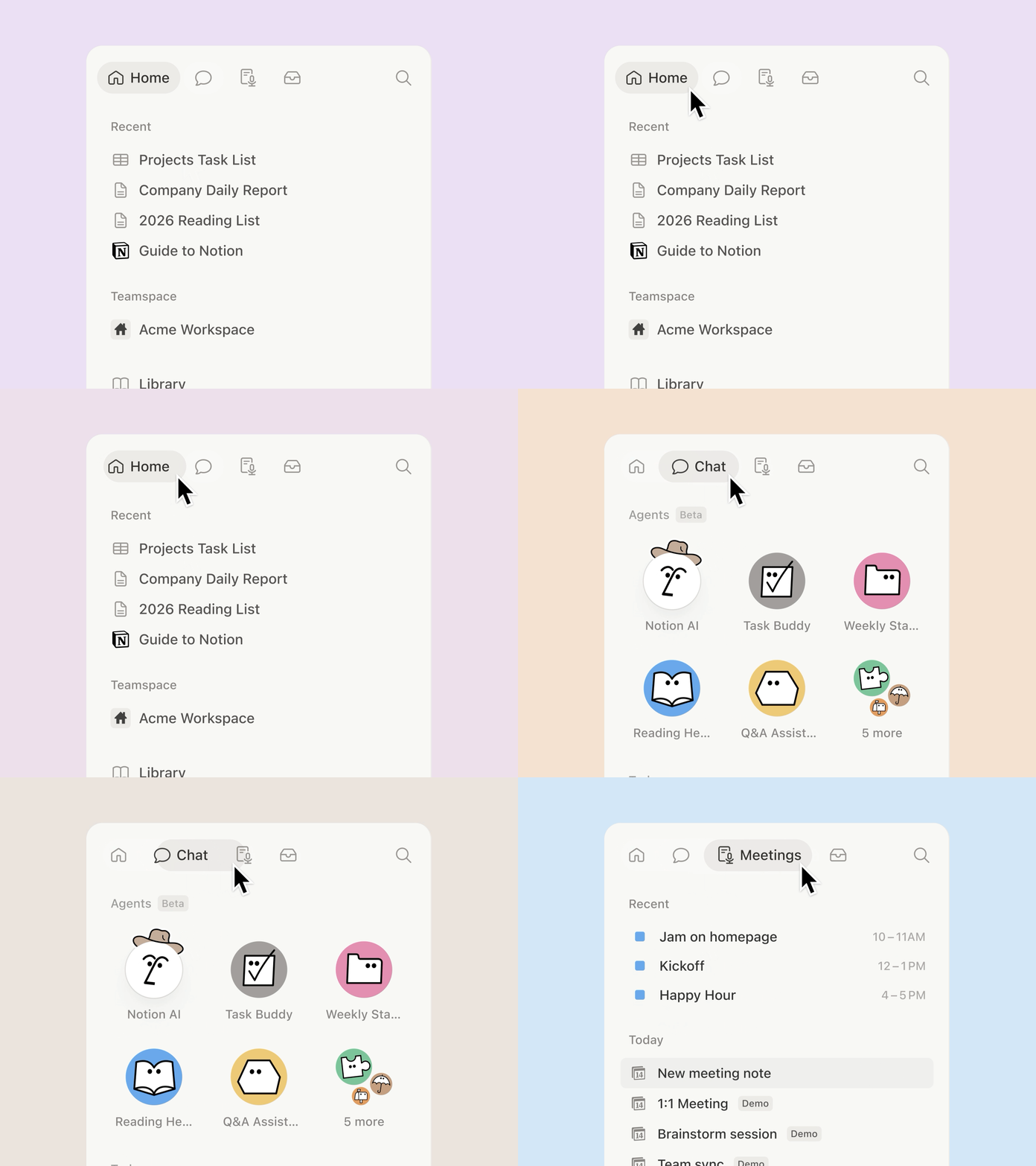
Meeting notes also got its biggest upgrade, including a new home in your sidebar.

Finally, pages are loading 15% faster. It’s a strong start to 3.0!

A new home for all your meetings

AI Meeting Notes new home in the sidebar

Too often, notes get scattered (or forgotten). The new Meetings tab in your sidebar organizes notes from every meeting you’ve run or joined. It syncs with your calendar so you can easily prep notes, join calls, and use AI Meeting Notes to transcribe every detail. Just type /meet on any page and click start to kick off a meeting note. Check it out →.

Get the full context from meeting summaries

Now you can go to the exact moment in the transcript for every takeaway

AI Meeting Notes summaries now links each takeaway to the exact moment in the transcript, so you can jump straight to the source. It’s great for understanding how decisions were made, catching up on meetings you missed, or handing off action items with the full context.

Agent analyzes comments and CSVs

Agent can now read and take action on comments and uploaded CSVs

Now your Agent can read comments and version history when answering questions and drafting updates. This makes it easy to summarize feedback and page updates, or just ask your Agent to make edits from a comment, like “implement Holly’s feedback,” and it will update the doc. You can also upload a CSV and turn it into a database, or ask your Agent to analyze the file and surface the answers you need. Big upgrades (with more soon)!

Your calendar is now searchable

Connect your Google and Notion Calendars with Notion AI for better Enterprise Search results.

Notion AI can now search your Google and Notion Calendars, making it easier for your Agent to help you manage your day. Get quick help with meeting prep or analyzing your schedule. Try “Brief me on my schedule for the next week” or “When did I last meet with Steven and what were the action items?” Connect your calendar →

Search private Slack messages

Now you can search private channels and DM's with the upgraded Slack AI Connector

Our Slack AI Connector got a nice upgrade. It now supports private channels and Direct Messages, giving you even better search results and your Agent more helpful context. As always, all Slack permissions are respected.

Place it on the map view

Databases now have a Map view and Place property

Need to track addresses or map locations? The new map view and place property in databases is for you. Whether you’re planning your next company event or your regional office expansion, map view brings it to life. You can also ask your Agent to add a place property and update an existing database with locations and watch the magic happen.

Less load time, more work time

Pages now load 15% faster and navigating between pages on mobile and desktop are faster

Pages are loading 15% faster! Navigating between pages on desktop and mobile is quicker than ever. Performance matters to you—and we’re on it.

Other updates we’re excited about

  • Restrict logins to approved IP addresses. This is an important and common request! Learn more →

  • The new database conditional coloring now supports formulas, relations, and rollups.

  • Database filtering now supports sub-items to see exactly what matters.

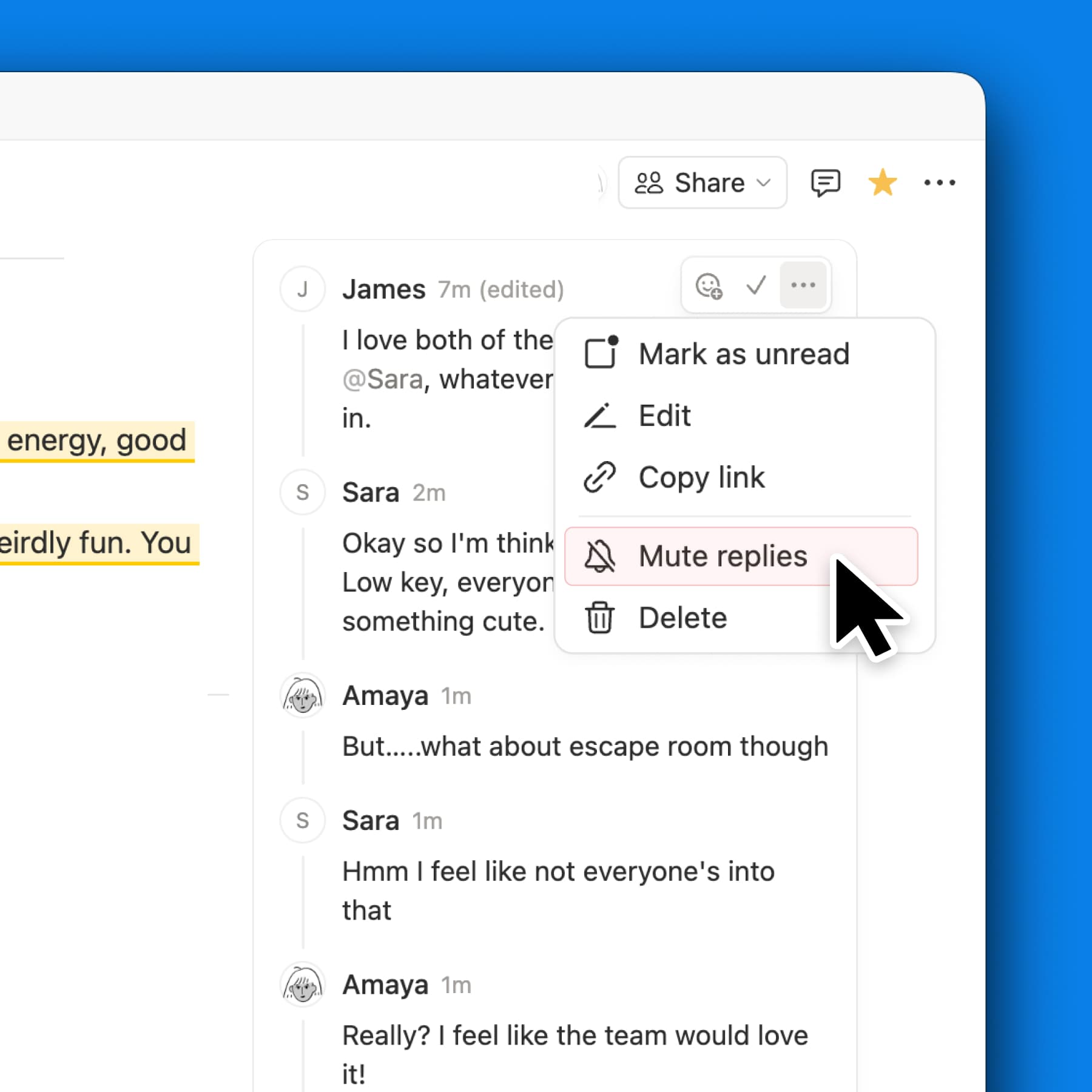
  • When a teammate reacts to your comment with an emoji, you’ll see quick notification (like this).

  • Create a two-way sync with Notion Calendar and your databases! Now you can edit text properties, like descriptions, in Calendar.

  • The Figma × Notion MCP integration is live! Here’s a demo that connects Figma Make to a Notion Product Requirements Doc to build a prototype.

  • You can now create pages from your database templates with the Notion API.

  • Stay on the lookout for seasonal Agent accessories—like these for Halloween!

Page discussions in one place

Catch up on comments

It’s now easier to review the latest comments when collaborating with your team. This simplified view of page discussions lets you navigate to recent comments, identify what's new, and mark comments to return to later.

Inbox made simpler

New grouped notifications in your inbox mean fewer notifications and a cleaner view, so you can spot what matters and jump to the latest comments fast.

Agent now reads CSVs

Notion Agent can now read CSVs to find insights in seconds. Drop in any CSV (up to 1,000 rows) and ask your Agent to create an analysis or visualize your data as a chart or board. Perfect for expenses, customer lists, or project trackers.

For larger files, see the CSV importer from your workspace settings. Learn more from our Help Center →

3.0

Notion 3.0: Agents

Notion 3.0 is here! We’ve rebuilt Notion AI from the ground up as Agents.

Now, anything you can do in Notion, your Agent can do for you. It’s the most advanced knowledge work agent in the world. It’s capable of over 20 minutes of multi‑step actions with a state‑of‑the‑art memory system (using Notion pages and databases).

With Notion 1.0 and 2.0, we gave you the tools to do your work in one place. With 3.0, you get Agents that do the work for you, so you can reclaim time and focus on building your life’s work.

Anything you can do in Notion, your Agent can do (across dozens of pages at once)

So how is this different from what Notion AI already does? Think of it as a complete upgrade. Your personal Agent can take on a whole project, like building a launch plan, breaking it into tasks, assigning them, and even drafting docs to give your team a head start.

With databases, it works at a scale no person could—updating or creating hundreds of pages at once. Ben Levick, the Head of AI & Ops at Ramp, put it perfectly: “We can now instantly spin up ready-to-use systems that used to take hours of busywork. Then we use those Notion Agents to power whole new workflows at scale.”

Your personal Agent pulls context from your workspace, connected tools like Slack, Google Drive, and GitHub, and even the web (always within your permissions) so the work it delivers feels made for you. The use cases are nearly endless, but here are a few standouts.

Personalize your Agent’s instructions and memory

“It’s like a coworker that’s been around and has genuine context.” That’s how Faire Product Manager Harsha Yeddanupudy described it, and it’s exactly what makes memory the most powerful (and fun!) part of Agent. Give your Agent an instructions page so it feels like a teammate who knows your work and style. Tell it how you like things written, what to reference, and even where to file tasks and it’ll do the work your way. Best of all, it remembers over time, so you don’t have to keep repeating yourself.

Make it cute (no, really)

Imagine a whole team of Agents, each with their own specialty, running on autopilot. Soon, you’ll be able to build any Custom Agent your team needs. One to wrangle customer feedback, one to post weekly project updates, one to handle IT requests … your Agents have it covered.

Unlike your personal Agent, Custom Agents can run autonomously on a schedule or triggers you set, so work keeps moving even while you’re asleep. Just like your personal Agent, Custom Agents follow your instructions and permissions, so you’re always in control. If you want to learn more about Custom Agents, sign up here and we’ll be in touch!

Database row permissions are here!

Now you can control exactly who sees each row in your database with page-level access. Keep tasks visible to who they’re assigned to, collaborate easily with consultants and clients, and keep sensitive company info from getting in the wrong hands—all while maintaining a source of truth for your team. Available for Business and Enterprise plans. Learn more →

Give AI the context it needs with AI connectors

Notion AI, like any teammates, does its best work when it has the full picture. Connect your favorite tools to Notion so context lives where work happens. That way, Enterprise Search can surface answers quickly and your Agent can complete tasks with the right context. We’re continuing to add new connectors, with Notion Mail live today, and Box and Outlook Mail coming next.

When the team at Affirm connected their tools to Notion, it clicked right away: “We replaced our stand‑alone search with Notion AI because answers belong where people work.”

Notion’s MCP ecosystem just got bigger

Another big upgrade today: We’ve expanded our list of first-party MCP integrations with lots of new partners like Lovable, Perplexity, Mistral, and HubSpot. With Notion MCP, your tools can read context from your Notion workspace (and your connected apps) and write back to Notion.

Here’s what that looks like in practice: If you’re coding in Cursor, it can pull the latest tech specs from Notion, update the codebase, then mark the task as done in Notion. The Notion ecosystem is more open than it’s ever been, and we’re just getting started.

The best AI models, built in

AI models evolve quickly. With Notion, you don’t pay extra for every model. The latest—like Claude Sonnet 4 and GPT-5—are already built in. Just pick the model you want for your Agent, and it instantly gets to work across your workspace while respecting existing permissions.

Notion AI will write your formulas

Formulas used to be their own language. Now you just describe what you want, from simple math to complex property logic, and Notion AI creates the perfect formula for you. Here’s a quick demo. Give them a try inside any database or automation!

2.53

Notion 2.53: Offline mode

Work offline in Notion

We’re excited to finally say it: you can access pages, capture ideas, and keep work moving on the Notion desktop and mobile app offline. Judging by Reddit, this is the feature everyone’s been waiting for. The most essential blocks work offline, with more on the way soon. Here's a quick guide to how offline works

Download pages for offline use

You can download any page and use it without the internet (and even create new ones). Manage them all from the new offline dashboard (SettingsOffline). Your Recents and Favorites are auto-downloaded for offline use if you’re on the Plus, Business, or Enterprise plan. We’re starting here and we’ll keep making offline in Notion even better.

Notion Mail is now on iOS

We hope Notion Mail has been bringing some joy to your inbox. Now you can stay on top of your emails on the go (even offline!). Download the Notion Mail iOS app →

Use your favorite AI tools with Notion’s MCP

Notion’s Model Context Protocol (MCP) server lets your AI tools securely reference, create, and update content within Notion. Just connect ChatGPT, Claude, or Cursor to turn prompts into new Notion pages, updated tasks, and more. Check out these quick demos from ChatGPT and Claude, and our technical docs to learn more!

Create and manage tasks right in Notion Calendar

Manage your work—tasks, milestones, even personal goals—alongside your schedule. Connect any Notion database with dates to Calendar, then create, schedule, and complete tasks in the same place you plan your time. Here’s a quick guide to get started. Try out Notion Calendar (it's free) →

Notion in Indonesian, Thai, and Vietnamese

We’re excited to share that we’re taking a big step toward making Notion feel native for millions more people. Starting now, Notion—along with Notion Calendar, Notion Faces, and Marketplace—is available in Indonesian, Thai, and Vietnamese in app and on web.

Here’s how you can set your language:

  • On web or desktop, go to SettingsPreferencesLanguage

  • On mobile, change your device language to Indonesian, Thai, or Vietnamese in your system settings and your Notion mobile app will automatically change its language too.

Our most popular help tutorials and guides are also now localized. For language-specific help, visit: